sreg tool
sreg is the only way to publish a version to Serverless Registry. It packages the project,
uploads the files straight to R2 through presigned URLs and commits the version through the registry's API. Published
versions are immutable. It also downloads generic files and writes credentials for package managers, including GitHub Actions OIDC tokens.
Administration (credentials, yank, delete) is done in the registry's web panel.
Setup
Release binaries are published for macOS (arm64, x86_64), Linux (x86_64 glibc and musl, arm64) and Windows (x86_64).
curl --proto '=https' --tlsv1.2 -LsSf https://github.com/kduma-OSS/serverless-registry-cli/releases/latest/download/sreg-cli-installer.sh | sh
powershell -ExecutionPolicy Bypass -c "irm https://github.com/kduma-OSS/serverless-registry-cli/releases/latest/download/sreg-cli-installer.ps1 | iex"
cargo install --git https://github.com/kduma-OSS/serverless-registry-cli --locked sreg-cli
Building from source needs Rust 1.88 or newer. In GitHub Actions use the actions instead - they install sreg with checksum verification.
Configuration
There is no configuration file, only flags and environment variables. They are accepted by every command (global options):
| Flag | Environment variable | Description |
|---|---|---|
--registry <URL> | REGISTRY_URL | Base URL of the registry, e.g. https://packages.example.com. It may carry the token (see below). |
--token <TOKEN> | REGISTRY_TOKEN | Token in the form [<source>.]<project>:[<type>.]<secret>. |
--json | Print machine-readable JSON only on stdout. | |
-v, --verbose | Logs of sreg itself to stderr (-v debug, -vv trace). Tokens and presigned URLs are never logged. | |
--no-browser | SREG_NO_BROWSER | With --login: print the approval page instead of opening it in a browser. |
In CI pass both the URL and the token as environment variables from repository secrets.
Credentials in the registry URL
As with Composer, the registry URL may carry the token instead of --token / REGISTRY_TOKEN:
export REGISTRY_URL='https://shop-frontend:k7Qx2mN9pLw4@packages.example.com/'
sreg whoami
- both a login and a password are required; percent-encode
@,:,/,?,#and%in them, - credentials are accepted only over
https(plainhttponly forlocalhostand127.0.0.1), sregstrips the credentials before using the URL: requests, output, logs and--jsononly showhttps://packages.example.com/,--oidcwins over everything; otherwise an explicit token and the URL's credentials must agree when both are given.
Treat such a URL as a secret (in GitHub Actions store it in secrets.).
Where the token comes from
A static token (--token / REGISTRY_TOKEN, or the credentials of the registry URL), or one of two options that replace it: --oidc (GitHub Actions OIDC) and --login (a short-lived token approved in the browser, see sreg login). --login and --oidc cannot be combined.
Commands
| Command | What it does |
|---|---|
sreg composer publish | Archive a Composer package with git archive and publish it. |
sreg npm publish | Pack with npm pack and publish an npm package. |
sreg cargo publish | Package with cargo package and publish a crate. |
sreg nuget publish | Pack with dotnet pack and publish a NuGet package. |
sreg swift publish | Archive a Swift package and publish it. |
sreg maven publish | Publish Maven / Gradle artifacts from a local repository. |
sreg generic publish | Publish arbitrary files as a version of a generic package. |
sreg generic get | Download and verify files of a generic package version. |
sreg auth | Write registry credentials for a package manager, or print them. |
sreg login | Sign in through the browser and print a short-lived token to export. |
sreg whoami | Show the identity and grants of the current token. |
sreg version | Show the version of sreg and of the registry. |
Common behaviour of publish commands
Every publish command works the same way:
- packages the project (see the table below),
- computes the SHA-256 digest and size of every file and calls
init- the registry checks the token'spublishgrant for the package and version and returns one presigned upload URL per file, - uploads every file straight to R2 with
PUT(3 attempts with backoff; a newinitwhen the URLs expire), - calls
commit- the registry verifies the uploaded files, writes the immutable version manifest and rebuilds the index.
sreg never runs the native tools' publish, only their packing commands. The flags it sets itself are reserved and rejected after --;
everything else after -- goes verbatim to the tool (sreg cargo publish --version 1.2.0 -- --features ssl --locked).
| Ecosystem | Command | Flags set by sreg | Examples of flags to pass after -- |
|---|---|---|---|
| composer | git archive --format=zip HEAD:<path> (fallback: a zip of the directory without vendor/ and .git/) | - | - |
| npm | npm pack | --json, --pack-destination <tmp>, -w <pkg> from --workspace | --ignore-scripts |
| cargo | cargo package | --no-verify, --allow-dirty, -p <crate> from --package, --target-dir <tmp> | --features, --locked, --manifest-path |
| nuget | dotnet pack <project> | -o <tmp>, -p:PackageVersion=<v> from --version | -c Release, --no-build, --include-symbols |
| swift | swift package dump-package, then swift package archive-source | -o <tmp>/<name>-<version>.zip | --verbose |
| maven | none - the build deploys into --from-dir first | - | - |
| generic | none - the files are ready | - | - |
Options shared by the publish commands
Accepted by composer, npm, cargo, nuget, swift and maven publish (generic publish has its own set, see below).
| Option | Description |
|---|---|
--version <VERSION> | Version to publish. Composer and Swift: instead of the release tag on HEAD (v1.2.3 becomes 1.2.3). npm, cargo and NuGet: written into the manifest (or passed to dotnet pack) before packaging; sreg says so on stderr and leaves the change in the working tree. Maven: selects the version directory. |
--tag-prefix <PREFIX> | Take the version from the tag on HEAD that starts with the prefix, e.g. sdk/v for sdk/v1.2.3. Cannot be combined with --version. Without both, only v<semver> tags are considered and more than one on HEAD is an error. For monorepos. |
--dry-run | Stop after the registry accepted the upload declaration (init): everything is validated, nothing is uploaded. |
--skip-existing | When the version is already published, print version already published, skipping and exit 0 instead of 2. Makes re-running a workflow safe. |
--oidc | Authenticate with a GitHub Actions OIDC token instead of REGISTRY_TOKEN (the job needs permissions: id-token: write). |
--oidc-project <PROJECT> | With --oidc: the project the token is issued for. Without it the registry finds the project from the repository the token was issued to. |
--login | Sign in through the browser and approve this publish: you get a 15-minute token for exactly the version being published (see sreg login). Cannot be combined with --oidc. |
With --json, a successful publish prints { "eco", "name", "version", "url", "files": [{ "name", "url" }] };
a skipped version prints { "skipped": true, "eco", "name", "version" }.
Publishing prebuilt archives
composer, npm, cargo and nuget publish accept --archive <FILE> (.zip, .tgz, .crate, .nupkg) to publish an
archive built earlier, byte for byte. Build, test and sign the archive in one job and publish exactly those bytes from another,
or migrate historical releases without changing their checksums.
sreg npm publish      --archive package.tgz
sreg composer publish --archive package.zip
sreg cargo publish    --archive package.crate
sreg nuget publish    --archive Package.1.2.3.nupkg
- The file is uploaded as it is: the SHA-256 the registry records is the SHA-256 of the input file. Only the name it is stored under follows the registry's conventions.
- Identity, version and dependencies come from the manifest inside the archive (
package/package.json,composer.json,Cargo.toml, the.nuspec). The archive is validated completely before the first request. - No git checkout and no native tool is needed, and tags in the current directory are ignored.
--versionis only a consistency check - it must equal the version in the archive (a Composer archive whosecomposer.jsonhas noversionis the exception: there--versionis the version to publish).--tag-prefix,--path(composer),--workspace(npm),--package(cargo),--projectand--no-symbols(nuget) and arguments after--are rejected together with--archive.--dry-run,--skip-existing,--json, authentication and exit codes work as before;npm publish --archivestill takes--tag. A NuGet symbols package is not published in this mode.
$ sreg npm publish --archive acme-ui-2.2.0.tgz --dry-run
Dry run: the registry accepted npm @acme/ui 2.2.0; nothing was uploaded.
FILE               SIZE  SHA256                                                            LABELS
acme-ui-2.2.0.tgz  225   d4ea7dc95643a011146180e0d224fb91dfe3efbc544d3841e955d82c9586183c

$ sreg npm publish --archive acme-ui-2.2.0.tgz --version 9.9.9
error: failed to read the npm archive acme-ui-2.2.0.tgz: invalid input: the tarball contains @acme/ui@2.2.0, but --version 9.9.9 was given
Requires sreg 0.1.3 or newer.
Migrating Cargo crates from another registry
A crate built for a retired registry names that registry's index in its Cargo.toml. To publish it here without touching the archive, name the old index:
sreg cargo publish \
  --archive licensing-kit-example-1.2.3.crate \
  --source-registry-index sparse+https://old.example.com/cargo/index/
Dependencies that refer to that index are described in this registry's sparse index as dependencies from the same registry
(registry: null), so cargo resolves them here and the old host is never contacted. The archive and its checksum stay unchanged;
dependencies from other registries keep their identity.
sreg composer publish
sreg composer publish [--path <DIR> | --archive <FILE>] [--version <V> | --tag-prefix <P>] [--dry-run] [--skip-existing] [--oidc [--oidc-project <P>] | --login]
Archives a Composer package and publishes it. Composer has no packing tool, so sreg packs by itself.
| Option | Default | Description |
|---|---|---|
--path <DIR> | . | Directory of the package to publish (monorepos: --path packages/sdk). |
Plus --archive <FILE> (prebuilt archives) and the shared options.
How it works:
- Name:
nameincomposer.jsonis required and must be a valid Composer name (vendor/package, lower case). - Version: from
--version, or the release tag pointing atHEAD(v1.2.3becomes1.2.3; with--tag-prefix sdk/v,sdk/v1.2.3;--tag-prefix ""for bare1.2.3tags). Versions areMAJOR.MINOR.PATCH, optionally with-alpha,-betaor-rcand a number (1.0.0-rc1,1.0.0-beta.2);dev-*branches, other prerelease labels and build metadata are rejected. Ifcomposer.jsondeclares aversion, it must equal the published one - best leave it out. - Archive: in a git repository
git archive HEAD:<path>: the package directory becomes the archive root, only committed files are published and paths markedexport-ignoreare left out. Put the rules into the package directory's own.gitattributes.composer.jsonmust be committed and equal to the one on disk. Outside a git repository the directory is zipped withoutvendor/and.git. - Upload: the archive as
<package>-<version>.zip(acme/sdk1.2.3 becomessdk-1.2.3.zip);composer.jsonis the version's manifest.
git tag v1.2.3
sreg composer publish                                    # acme/sdk 1.2.3 from the tag
sreg composer publish --version 1.2.4                    # explicit version
sreg composer publish --dry-run                          # validate only
sreg composer publish --path packages/sdk --tag-prefix sdk/v   # monorepo
$ sreg composer publish --version 1.0.0
Published composer acme/sdk 1.0.0
https://packages.example.com/composer/dist/acme/sdk/1.0.0.zip

$ sreg composer publish --version 1.0.0
error: failed to publish composer acme/sdk 1.0.0: this version already exists in the registry
hint: published versions are immutable; bump the version to publish again
(the second call exits with 2; with --skip-existing it exits with 0).
sreg npm publish
sreg npm publish [--version <V> | --tag-prefix <P>] [--tag <TAG>] [--workspace <W> | --archive <FILE>] [shared options] [-- <npm pack args>]
Packs the project in the current directory with npm pack and publishes the tarball.
| Option | Default | Description |
|---|---|---|
--tag <TAG> | latest (next for prereleases) | Distribution tag of this version. |
--workspace <W> | - | Publish this npm workspace (name or path) of the project in the current directory: npm pack -w <W>. |
--archive <FILE> | - | Publish this .tgz as it is instead of running npm pack (details). |
-- <npm pack args> | - | Extra arguments passed verbatim to npm pack, e.g. --ignore-scripts. |
How it works:
- Only scoped packages (
@scope/name) are served by the registry; the version must be semver. - With a version requested,
sregfirst writes it intopackage.json(npm pkg set version=<v>, with-wfor workspaces) and says so on stderr. Without--versionand--tag-prefixit uses thev<semver>tag onHEAD, falling back to the version inpackage.json. - Runs
npm pack --json --pack-destination <tmp>and readspackage/package.jsonfrom the tarball (without fields starting with_) as the manifest. - Uploads the tarball under the name
npm packgave it (@acme/sdk1.2.3 becomesacme-sdk-1.2.3.tgz).
sreg npm publish --version 1.2.3
sreg npm publish --tag beta -- --ignore-scripts
sreg npm publish --workspace packages/sdk --tag-prefix sdk/v   # npm workspaces
$ sreg npm publish --version 2.1.0
note: set the version in ./package.json to 2.1.0 (npm pkg set)
Published npm @acme/ui 2.1.0
https://packages.example.com/npm/@acme/ui/-/ui-2.1.0.tgz
sreg cargo publish
sreg cargo publish [--version <V> | --tag-prefix <P>] [--package <CRATE> | --archive <FILE> [--source-registry-index <URL>]] [shared options] [-- <cargo package args>]
Packages a crate with cargo package and publishes the .crate.
| Option | Default | Description |
|---|---|---|
--package <CRATE> | the crate of the current directory, or the only crate of the workspace | Publish this workspace member (cargo package -p <CRATE>). |
--archive <FILE> | - | Publish this .crate as it is instead of running cargo package (details). |
--source-registry-index <URL> | - | With --archive: index URL of the retired registry the crate was built for (migrating crates). |
-- <cargo package args> | - | Extra arguments passed verbatim to cargo package, e.g. --locked, --features ssl, --manifest-path. |
How it works:
cargo metadata --no-depsfinds the crate. With a requested version,sregwrites it into the crate'sCargo.toml(formatting preserved); a crate withversion.workspace = truecannot get its own--version- set it in[workspace.package]instead. Without--versionit uses thev<semver>tag onHEAD, falling back toCargo.toml.- Runs
cargo package --no-verify --allow-dirty -p <crate> --target-dir <tmp>. - Uploads the
.crateas<name>-<version>.crate. The manifest is the crate's line of the cargo sparse index, built fromcargo metadata: dependencies from crates.io point at the crates.io index, dependencies from another registry (declared withregistry = "<name>") are taken to come from this registry. Path-only dev-dependencies are left out, ascargo publishdoes. - Make the registry known to cargo for consumers with
sreg auth cargo.
sreg cargo publish --version 1.4.2
sreg cargo publish --package acme-core --tag-prefix core/v -- --locked
$ sreg cargo publish --version 0.3.0
note: set the version in /work/Cargo.toml to 0.3.0 (was 0.1.0)
Published cargo acme-core 0.3.0
https://packages.example.com/cargo/dl/acme-core/0.3.0
sreg nuget publish
sreg nuget publish [--version <V> | --tag-prefix <P>] [--project <PROJECT>] [--no-symbols] [--archive <FILE>] [shared options] [-- <dotnet pack args>]
Packs a project with dotnet pack and publishes the .nupkg (and symbols).
| Option | Default | Description |
|---|---|---|
--project <PROJECT> | the single .csproj in the current directory | Project file to pack. Solutions (.sln) are refused because they produce several packages. |
--no-symbols | Do not publish the .snupkg symbols package that dotnet pack produced. | |
--archive <FILE> | - | Publish this .nupkg as it is instead of running dotnet pack (details). |
-- <dotnet pack args> | - | Extra arguments for dotnet pack, e.g. -c Release, --no-build, --include-symbols. |
How it works:
- Runs
dotnet pack <project> -o <tmp>with the requested version passed as-p:PackageVersion=<v>. Without--versionand--tag-prefixthev<semver>tag onHEADis used, falling back to the project's own version. - Uploads the
.nupkgas<id>.<version>.nupkg(lower case) and, whendotnet packproduced one (e.g. with-p:IncludeSymbols=true -p:SymbolPackageFormat=snupkg) and unless--no-symbols, the.snupkg. Legacy.symbols.nupkgpackages are ignored. - The manifest holds the id, version, description, authors, project URL, license expression, tags and dependency groups from the
.nuspec, plus the.nuspecitself.
sreg nuget publish --version 1.2.0 -- -c Release
sreg nuget publish --project src/Acme.Sdk/Acme.Sdk.csproj --tag-prefix sdk/v --no-symbols
sreg swift publish
sreg swift publish --scope <SCOPE> [--path <DIR>] [--repository-url <URL>] [--version <V> | --tag-prefix <P>] [shared options] [-- <archive-source args>]
Archives a Swift package and publishes it as <scope>.<name>.
| Option | Default | Description |
|---|---|---|
--scope <SCOPE> | required | Registry scope to publish under (1-39 characters of A-Z, a-z, 0-9 and -). Swift packages have no scope of their own. |
--path <DIR> | . | Directory of the package (with Package.swift). |
--repository-url <URL> | the URL of the origin git remote, if any | Source repository URL recorded with the version. Credentials in the URL are stripped. |
-- <archive-source args> | - | Extra arguments for swift package archive-source. |
How it works:
- Name:
nameinPackage.swiftas reported byswift package dump-package(1-100 characters ofA-Z,a-z,0-9,_and-); published as<scope>.<name>. - Version:
Package.swifthas no version, so it comes from--versionor the release tag onHEAD(v1.2.0, or<prefix>1.2.0); without either, the command fails. Versions are semver 2 without a leadingv. - Files: the zip written by
swift package archive-source(it archives the committed state of a git repository) as<name>-<version>.zip;Package.swiftand everyPackage@swift-<version>.swiftnext to it asmanifestfiles. - Manifest: the tools version, the repository URL and the complete output of
swift package dump-package. - Consumers point SwiftPM at
<registry>/swiftwithswift package-registry set <registry>/swift --scope acmeand log in withsreg auth swift.
git tag v1.2.0
sreg swift publish --scope acme                              # acme.DemoKit 1.2.0 from the tag
sreg swift publish --scope acme --version 1.3.0-beta.1
sreg swift publish --scope acme --path packages/Kit --tag-prefix kit/v
sreg maven publish
sreg maven publish --from-dir <DIR> [--coords <GROUP:ARTIFACT>] [--version <V> | --tag-prefix <P>] [shared options]
sreg does not run Maven or Gradle. Let the build deploy into a local directory (a Maven-2 file repository) and publish one artifact version from it.
| Option | Description |
|---|---|
--from-dir <DIR> | Required. The local repository the build deployed to. |
--coords <GROUP:ARTIFACT> | The artifact to publish when the repository holds several (multi-module builds; publish each module with its own call). |
How it works:
- Artifact: looks for
<group/as/path>/<artifactId>/<version>/<artifactId>-<version>.pomunder--from-dir. The package name in the registry is<groupId>:<artifactId>. - Version:
--versionor the release tag onHEADselects the version directory; without either the directory must hold exactly one version.-SNAPSHOTversions are rejected.sregdoes not change the build: the version the build used must be the one being published. - POM: must be an effective POM - a
<parent>or a${...}property in coordinates, packaging or dependencies is rejected (Gradle writes resolved POMs; with Maven deploy a flattened POM, e.g. withflatten-maven-plugin). ItsgroupId,artifactIdandversionmust match its location. - Files: every file of the version directory except checksums (the registry serves its own) and
maven-metadata*.xml, each with a role:pom,archive(the packaging's extension),sources,javadoc, Gradlemodulemetadata, orextra(classified jars, distributions,.ascsignatures). - Manifest:
groupId,artifactId,version,packaging, the POM itself and the dependencies with theirscopeandoptionalflag.
mvn -B deploy -DaltDeploymentRepository=local::file:./out
sreg maven publish --from-dir out --coords com.acme:sdk
# maven-publish with a repository pointing at a file:// URL (build/repo)
./gradlew publish
sreg maven publish --from-dir build/repo --coords com.acme:sdk --version 1.4.0
sreg generic publish
sreg generic publish <NAME> <VERSION> [FILE]... [--label <K=V>]... [--meta <K=V>]... [--meta-file <FILE>] [--spec <FILE>] [--no-append] [--dry-run] [--skip-existing] [--oidc [--oidc-project <P>] | --login]
Publishes files as one version of a generic package (binaries, installers, anything).
| Argument / option | Description |
|---|---|
<NAME> | Package name [<group>/]<name>, lower case, e.g. tools/acme-tool. |
<VERSION> | Semver, e.g. 1.2.0 or 1.3.0-rc.1. There is no version autodetection. |
[FILE]... | Files to publish; each is published under its file name. |
--label <K=V> | Label applied to every file of the call (repeatable), e.g. os=linux. Consumers filter by labels. sreg adds no default labels. |
--meta <K=V> | Metadata entry of the version, as a string (repeatable). |
--meta-file <FILE> | JSON object with the metadata of the version; --meta entries override its keys. |
--spec <FILE> | JSON file listing files with their own labels: [{"path": "...", "labels": {"os": "linux"}}, ...] - instead of FILE arguments. |
--no-append | Require a new version instead of adding the files to an already published one. |
--dry-run, --skip-existing, --oidc, --oidc-project, --login | As in the shared options. Here --skip-existing also applies to a file being appended that already exists. |
How it works:
- By default files are appended to an already published version, as long as the registry's append window (
APPEND_WINDOW_HOURS, 24 h by default) has not passed and the file names are new. This lets a CI matrix publish one file per job (Linux, macOS, Windows builds) into the same version. A committed file is immutable. - Arguments after
--are rejected.
sreg generic publish tools/acme-tool 1.4.0 acme-linux.tar.gz   --label os=linux   --label arch=x86_64
sreg generic publish tools/acme-tool 1.4.0 acme-macos.tar.gz   --label os=macos   --label arch=arm64
sreg generic publish tools/acme-tool 1.4.0 acme-windows.zip    --label os=windows --label arch=x86_64 --json
$ sreg generic publish tools/acme-tool 1.4.0 acme-linux.tar.gz --label os=linux
Published generic tools/acme-tool 1.4.0
https://packages.example.com/generic/tools%2Facme-tool/1.4.0
Publishing the same file again exits with 2 (a file with this name already exists in the published version).
sreg generic get
sreg generic get <NAME> [VERSION] [--label <K=V>]... [--sole] [--out <PATH>] [--prerelease] [--oidc [--oidc-project <P>] | --login]
Downloads the files of a generic package version after verifying their size and SHA-256. Needs a read token with a grant for the package.
| Argument / option | Default | Description |
|---|---|---|
<NAME> | Package name [<group>/]<name>. | |
[VERSION] | latest | An exact version, a constraint resolved by the registry (npm syntax: ^1.2, ">=1 <2", 1.x) or latest. The resolved version is printed on stderr. |
--label <K=V> | Only files with this label (repeatable; all must match). | |
--sole | Fail unless the label filter selects exactly one file, and download that file. When several match, the candidates are listed and sreg exits with 1. | |
--out <PATH> | . | Directory to write the files to; with --sole also the path of the file (an existing directory or a path ending in / stays a directory). |
--prerelease | With latest or a constraint, consider prerelease versions too. | |
--oidc, --oidc-project | Authenticate with a GitHub Actions OIDC token. | |
--login | Sign in through the browser and approve this download (sreg login); the token is kept in memory only. |
The paths of the downloaded files are printed on stdout. With --json sreg prints the version's feed entry (name, version, published, yanked, meta and files with size, sha256, labels and url) without downloading.
sreg generic get tools/acme-tool '^1.0' --label os=linux --sole --out acme.tar.gz
sreg generic get tools/acme-tool --label os=macos --out dist/
sreg generic get tools/acme-tool latest --json
$ sreg generic get tools/acme-tool '^1.0' --label os=linux --sole --out acme.tar.gz
Resolved tools/acme-tool ^1.0 to 1.4.0 acme-linux.tar.gz
/work/acme.tar.gz

$ sreg generic get tools/acme-tool --sole
error: the labels select more than one file: 3 files of tools/acme-tool 1.4.0 match; add labels to select one.
hint: add --label filters to select one of these files of 1.4.0:
  acme-linux.tar.gz
  acme-macos.tar.gz
  acme-windows.zip
sreg auth
sreg auth <composer|npm|cargo|nuget|swift|maven> [--oidc [--project <PROJECT>] | --login] [--write <FILE>] [--registry-name <NAME>]
Hands the registry token to a package manager so that installing packages works. It either writes the token into the package manager's credentials file (--write) or prints what puts it in place. --registry / REGISTRY_URL is always required (the host and path determine where the token is stored); no request is made to the registry.
| Option | Default | Description |
|---|---|---|
--oidc | Build the token from a GitHub Actions OIDC token (<PROJECT>:gh.<jwt>, or _:gh.<jwt>) instead of REGISTRY_TOKEN. Needs id-token: write; the audience is the registry URL, which must equal the Worker's PUBLIC_URL. | |
--login | Sign in through the browser and get a short-lived pull token (one hour, longer with "extended validity") instead of REGISTRY_TOKEN - see sreg login. Cannot be combined with --oidc. | |
--project <PROJECT> | the registry finds it from the repository | With --oidc: the project the token is issued for; its credential must have a matching gh secret. Only accepted together with --oidc. (Publish commands call it --oidc-project.) |
--write <FILE> | print instead | Write to this file; an existing file is updated in place, other content is kept, a new file gets mode 0600. |
--registry-name <NAME> | sreg | cargo: registry name; NuGet: source name; Maven: server <id>. |
GitHub OIDC tokens are valid for minutes only, so run sreg auth --oidc right before the install step.
Without --write it prints a line or a command (treat the output as a secret):
| Ecosystem | Printed |
|---|---|
composer | export COMPOSER_AUTH='{"bearer":{"<host>":"<token>"}}' (use with eval "$(sreg auth composer)") |
npm | npm_config_//<host>/npm/:_authToken=<token>, plain NAME=value for "$GITHUB_ENV" (sreg auth npm >> "$GITHUB_ENV") |
cargo | export CARGO_REGISTRIES_<NAME>_TOKEN='<token>' |
nuget | dotnet nuget add source '<registry>/nuget/index.json' -n '<name>' -u '<login>' -p '<password>' --store-password-in-clear-text |
swift | swift package-registry login '<registry>/swift' --username '<login>' --password '<password>' |
maven | a settings.xml <server> snippet and a Gradle credentials snippet |
With --write <FILE>:
| Ecosystem | Typical file | Entry written |
|---|---|---|
composer | auth.json | "bearer": { "<host>": "<token>" } |
npm | .npmrc | //<host>/npm/:_authToken=<token> (the scope line @scope:registry=... is not written - add it yourself) |
cargo | ~/.cargo/credentials.toml | [registries.<name>] with token = "<token>" (the registry itself is declared in .cargo/config.toml with index = "sparse+<registry>/cargo/index/") |
nuget | nuget.config | source <name> and its clear-text credentials |
swift | ~/.netrc | machine <hostname> login <login> password <password> |
maven | ~/.m2/settings.xml | <server> with <id>, username and password |
With --json it prints { "eco", "file", "key" } (the token is not printed) when writing, or { "eco", "name", "value" } (richer objects for NuGet, Swift and Maven) otherwise.
# Local development: store a read token for Composer
sreg auth composer --write auth.json

# GitHub Actions: npm packages with an OIDC token of the project shop-frontend
sreg auth npm --oidc --project shop-frontend >> "$GITHUB_ENV"

# cargo with a custom registry name
eval "$(sreg auth cargo --registry-name acme)"

# Local development: sign in through the browser, no token to copy around
sreg auth npm --login --write .npmrc

# NuGet / Swift / Maven in CI
sreg auth nuget --oidc --project shop-frontend --write nuget.config
sreg auth swift --oidc --write ~/.netrc
sreg auth maven --oidc --write ~/.m2/settings.xml
$ sreg auth composer --write auth.json
Wrote the token of `shop-frontend` for bearer.packages.example.com to auth.json.
Details of every file format: docs/cli-auth.md.
sreg login
sreg login [--publish <ECO>:<PACKAGE>@<VERSION>]... [--no-browser] [--json]
Signs in through the browser and prints a short-lived token to export, for several commands in a row (eval "$(sreg login)").
It needs a registry credential with a login secret (a password and an optional one-time code), see
logins for people. Requires sreg 0.1.4 or newer.
| Option | Description |
|---|---|
--publish <ECO:PACKAGE@VERSION> | Ask for a publish token for this package version (repeatable), e.g. composer:acme/sdk@1.4.0 or npm:@acme/sdk@2.0.0. Without it the token is for downloading. |
--no-browser | Print the approval page instead of opening it (also SREG_NO_BROWSER). |
How it works:
sregasks the registry for a login session (no credential is sent), prints the page to open and the operation it requests, and opens the page unless--no-browseris given.- On the page you sign in with the project name and password of a
loginsecret (and a one-time code when it has one) or, if the browser is already signed in, only approve. The password and the page belong to the registry -sregnever sees them. sregpolls until you approve or refuse and receives the token. A refusal, an expired session or a timeout fails the command with exit code1.
The token is short-lived: a pull token (needs a read credential) lasts one hour, or longer when you tick "extended validity" (24 hours by default);
a publish token lasts 15 minutes and works only for the listed versions - it is approved only when a publish credential's grants allow every one of them.
The ecosystem in --publish ends at the first : (a Maven package is group:artifact) and the version starts after the last @ (an npm scope starts with one).
The same sign-in is available as --login on sreg auth, sreg generic get and every publish command, where the token is used directly:
eval "$(sreg login)"                                          # a pull token in $REGISTRY_TOKEN
eval "$(sreg login --publish composer:acme/sdk@1.4.0 --publish npm:@acme/sdk@2.0.0)"
sreg composer publish --login                                 # approve the publish of this one version
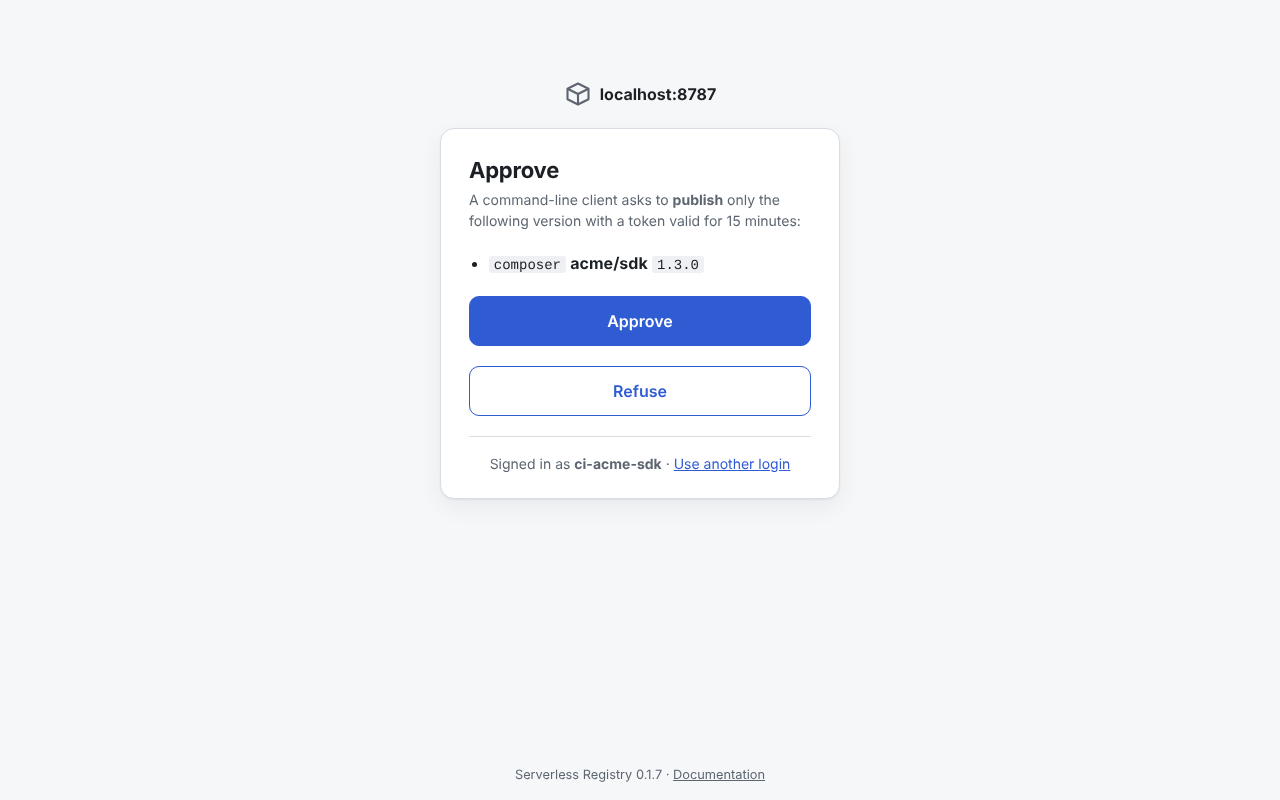
$ sreg composer publish --login --no-browser --version 1.3.0
Requesting a token to publish:
  composer acme/sdk 1.3.0
Open this page, sign in and approve:
  https://packages.example.com/authorize/<session>
Waiting for the approval (Ctrl-C to cancel)...
Approved: signed in as ci-acme-sdk (publish); the token is valid until 2026-10-28T20:43:51.000Z.
Published composer acme/sdk 1.3.0
https://packages.example.com/composer/dist/acme/sdk/1.3.0.zip
The approval page looks like this (see the Worker):
Protocol details: docs/cli-auth.md.
sreg whoami
sreg whoami
Shows the identity of the current token: the project, its kind and its grants (GET /api/v1/whoami). Useful to check that a token works and what it may do.
$ sreg whoami
Project: shop-frontend
Kind:    read
Grants:
  ECO       PACKAGE  VERSIONS  TRANSITIVE
  composer  acme/*   ^1.0      yes
  npm       @acme/*  *         yes
With --json: { "project", "kind", "grants": [{ "eco", "package", "versions", "transitive" }] } (transitive only for read credentials).
sreg version
sreg version
sreg --version
Prints the version of sreg; with --registry (or REGISTRY_URL) also the registry's version and the minimum client version it accepts. This endpoint is anonymous - no token is sent.
$ sreg version
sreg 0.1.5
registry 0.1.7 (schema 3, minimum client 0.1.0)
With --json: { "clientVersion", "registry": { "version", "minClientVersion", "schemaVersion" }, "compatible" }.
Exit codes
| Code | Meaning |
|---|---|
0 | Success. |
1 | Generic error. |
2 | The version already exists (409). |
3 | sreg is too old for the registry (426) - update it. |